
Reference

Dragon Tiger at sensa123 for Indonesia

Dragon Tiger at sensa123 gives you a fast live-table choice between Dragon, Tiger, and Tie without a crowded betting layout.

Dragon versus TigerLive dealer tableMobile wager panelRound history
sensa123 Dragon Tiger at sensa123 for Indonesia
sensa123 How Dragon Tiger rounds work

How Dragon Tiger rounds work

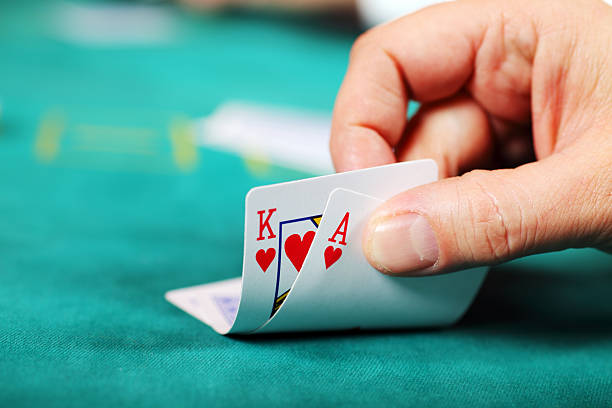
Each Dragon Tiger round uses one card for Dragon and one for Tiger, making the central decision easy to read before the dealer reveals both hands. A higher card wins, while a Tie wager applies only when the values match. We keep the table layout focused on those three outcomes so you can follow the action without switching screens. After clear phone

verification, your account opens the live-casino category and lets you choose the table view that suits your screen.


TABLE DETAILS

Three Dragon Tiger table cues

The appeal of Dragon Tiger is its short, visible round structure rather than a long sequence of decisions.

Updated today
sensa123 Three marked outcomes
CHOICE

Three marked outcomes

Dragon, Tiger, and Tie are labelled directly on the table surface. You choose the outcome before the dealing window closes, then the dealer reveals a single card for each side and the higher value decides the round.

sensa123 Short dealing cycle
PACE

Short dealing cycle

A Dragon Tiger hand moves from wager window to card reveal without extra draw decisions. This direct rhythm suits you if you want a live dealer format where the next result is visible quickly after the table closes.

sensa123 Result trail
DISPLAY

Result trail

The table view retains recent Dragon, Tiger, and Tie outcomes as a visual trail. It is a record of completed rounds, not a prediction tool, and you can check it while the next wagering window is open.

GAMEPLAY FLOW

Dragon Tiger wager mechanics explained

Before joining a Dragon Tiger round, choose the table from the live-casino lobby and wait for the dealer’s wager window to open.

Enter the live category From your logged-in lobby, open the live-casino category and select…
Choose a table outcome Tap or click Dragon when backing the Dragon side, Tiger…
Check the wager marker A placed selection appears as a marker in its chosen…
Read the revealed cards The dealer turns over one Dragon card and one Tiger…
TABLE TRANSPARENCY

Dragon Tiger table facts

Dragon Tiger is a live dealer card table, so its rhythm differs from animated slot rounds or Fishing God sessions.

01

Game type

Live dealer card table with one Dragon card and one Tiger card per round. The table uses a streamed dealer presentation and a separate digital wagering panel linked to your active account session.

02

Round pace

Short rounds with a defined betting window, card reveal, settlement, and the next opening window. Pace can vary by table connection and dealer cycle, so watch the on-screen countdown before placing a selection.

03

Supported devices

Dragon Tiger is available through a mobile browser and desktop browser after login. Phones place the stream above the controls, while wider screens show the stream, betting areas, and recent result trail side by side.

04

Access region

Access to Dragon Tiger depends on local law. We show the live-casino category only after your account reaches the lobby, and phone verification helps us keep account access clear before you enter a table.

PHONE TABLE VIEW

Dragon Tiger on your phone

Mobile Dragon Tiger keeps the dealer stream and the three wager areas within one vertical screen path.

Live stream above controls
Dragon, Tiger, Tie buttons
Visible round countdown
Browser and desktop access
sensa123 mobile gaming
TABLE HELP PATH

Help with Dragon Tiger access

If Dragon Tiger does not load as expected, begin with the live-casino category and confirm that your phone verification is complete. Our account-help route is available through the support area, where you can describe whether the issue involves table loading, a missing wager marker, or a session screen that has stopped updating. Keep the table name and approximate round time ready so we can locate the relevant session details more clearly.

Team online

Table stream issue

If the dealer stream pauses or does not open, return to the Dragon Tiger table list and load the chosen table again. Include your device type and connection state when you contact our support area for further account help.

Wager display question

If you cannot see a placed marker, check the table countdown and your account balance before the deal begins. Contact us through the support path with the selected outcome and approximate round time if the display remains unclear.

Account entry help

If the live category remains unavailable, confirm the phone verification step in your account area. Our support route can help you identify whether login status or a session refresh is preventing Dragon Tiger from opening.

FAIR TABLE SIGNALS

What to check before a round

A clear Dragon Tiger session starts with what you can see: the dealer feed, the named betting areas, the countdown, and the completed-round display.

Visible dealer feed

The Dragon Tiger table shows the dealing sequence through its live stream. You can watch the dealer complete the card reveal instead of relying solely on an animated result screen after the wager window ends.

Named wager areas

Dragon, Tiger, and Tie appear as distinct choices in the table panel. Keeping them separate helps you confirm which outcome you selected before the dealer begins the reveal sequence for that round.

On-screen countdown

The countdown marks the period in which the table accepts selections. Watching it gives you a clear point to check your wager marker, rather than assuming a late tap was included after dealing starts.

Displayed table rules

Each selected table provides its own visible rules for card comparison and Tie handling. Read those displayed terms before joining, because they are the relevant reference for that table’s completed rounds.

Account session record

Your active session connects the Dragon Tiger table display to your logged-in account. This helps you check the selected wager area and balance movement in the same session rather than using a separate screen.

Supportable round details

A table name and approximate round time give our support path useful context when you ask about a displayed result. Keep those details available if you need us to examine a table-access or session-display question.

LOBBY COMPARISON

Where Dragon Tiger fits

Dragon Tiger belongs in the live-table area, while the wider lobby also includes vivahoki, motobolasport, rocket138, bingo777, and Fishing God.

01

Dragon Tiger

A live dealer card table centred on Dragon, Tiger, and Tie outcomes. It suits you when you want each round to resolve from two revealed cards, with the betting panel visible alongside the dealer stream.

02

vivahoki

vivahoki is a separate lobby title with its own game presentation and controls. It does not use the Dragon Tiger side-versus-side card layout, so return to the live category when you want the dealer-table format.

03

motobolasport

motobolasport sits apart from Dragon Tiger in the lobby selection. Its session structure is different from a live table, while Dragon Tiger keeps you focused on the next Dragon, Tiger, or Tie decision.

04

rocket138

rocket138 offers a different screen flow from the live dealer environment. Dragon Tiger is the clearer choice when you prefer to watch an on-screen dealer reveal cards rather than follow a separate game interface.

05

bingo777

bingo777 uses a distinct room format and does not share Dragon Tiger’s three-choice wager panel. Select Dragon Tiger from live casino when the one-card comparison and short round rhythm are what you want.

06

Fishing God

Fishing God has an action-focused game screen, unlike the fixed Dragon Tiger table. For a dealer feed, visible countdown, and result trail based on card outcomes, enter the Dragon Tiger live table instead.

07

Live baccarat

Live baccarat also uses a dealer stream, but its hand structure involves more card rules than Dragon Tiger. Dragon Tiger keeps the comparison direct: one card for Dragon and one card for Tiger.

ROUND HIGHLIGHTS

Six Dragon Tiger table points

Dragon Tiger gives you a compact live-casino format with visible choices before every deal.

Dragon side Choose Dragon when you expect the Dragon card to rank…
Tiger side Choose Tiger when you expect the Tiger card to rank…
Tie option Tie applies when the Dragon and Tiger cards show matching…
Dealer reveal The live stream shows the dealer reveal one card for…
Round countdown A visible countdown indicates when the table is accepting selections.
Recent results The result trail displays completed Dragon, Tiger, and Tie outcomes…

Dragon Tiger questions answered

These answers cover the table details you are most likely to check before entering Dragon Tiger from our live-casino lobby. We focus on the live dealer format, the three betting choices, phone access, and the account steps that help the table open correctly. For a specific completed round, keep the table name and approximate time available when using the support path. Access to the game depends on local law.

Dragon Tiger is a live dealer card table where one card is dealt to Dragon and one to Tiger. You select Dragon, Tiger, or Tie before the dealing window closes, then the displayed card values determine the completed round.

Log in, complete the phone verification step if requested, open the casino lobby, and choose the live-casino category. Select Dragon Tiger from the available tables, then wait for the dealer stream and betting panel to finish loading.

Dragon means you are selecting the Dragon card to be higher, while Tiger means you are selecting the Tiger card to be higher. Tie refers to matching card values. The selected table’s displayed rules explain how it settles each outcome.

Yes, Dragon Tiger is designed for mobile browser access after login. The dealer stream appears above the wager controls, with Dragon, Tiger, and Tie options below it. You can also use desktop for a wider stream and result-trail view.

First check whether the betting countdown had already closed when you tapped the table area. Then check your account balance and refresh the selected table. If the marker remains unclear, contact us with the table name and approximate round time.

The table can show a recent result trail for completed Dragon, Tiger, and Tie rounds. That trail records earlier outcomes only. It does not determine or predict the values that the dealer will reveal in a later round.

Dragon Tiger access depends on local law. After login and phone verification, the live-casino category shows the tables available to your account session. If the category does not open, check your account status or use our support path.